Battleground
Your AI-powered Sales Coach - instant objection handling, discovery questions, and competitive guidance during live calls.
Overview
The Sales Coach is an AI-powered assistant that helps you handle objections, prepare for calls, and navigate competitive situations in real time. It uses your analysis data, knowledge base, and deal context to give tailored guidance.
Coach query limits
Adaptive AI
The Sales Coach uses Adaptive AI to automatically choose the best model for each query:
- Simple questions - Uses our fast AI model for instant responses
- Complex analysis - Uses our most powerful AI for deeper, more nuanced guidance
You don't need to do anything - the coach detects query complexity and routes accordingly. Simple objection lookups get sub-second responses, while complex strategic questions get the full power of our most capable model.
Response caching
Coaching Modes
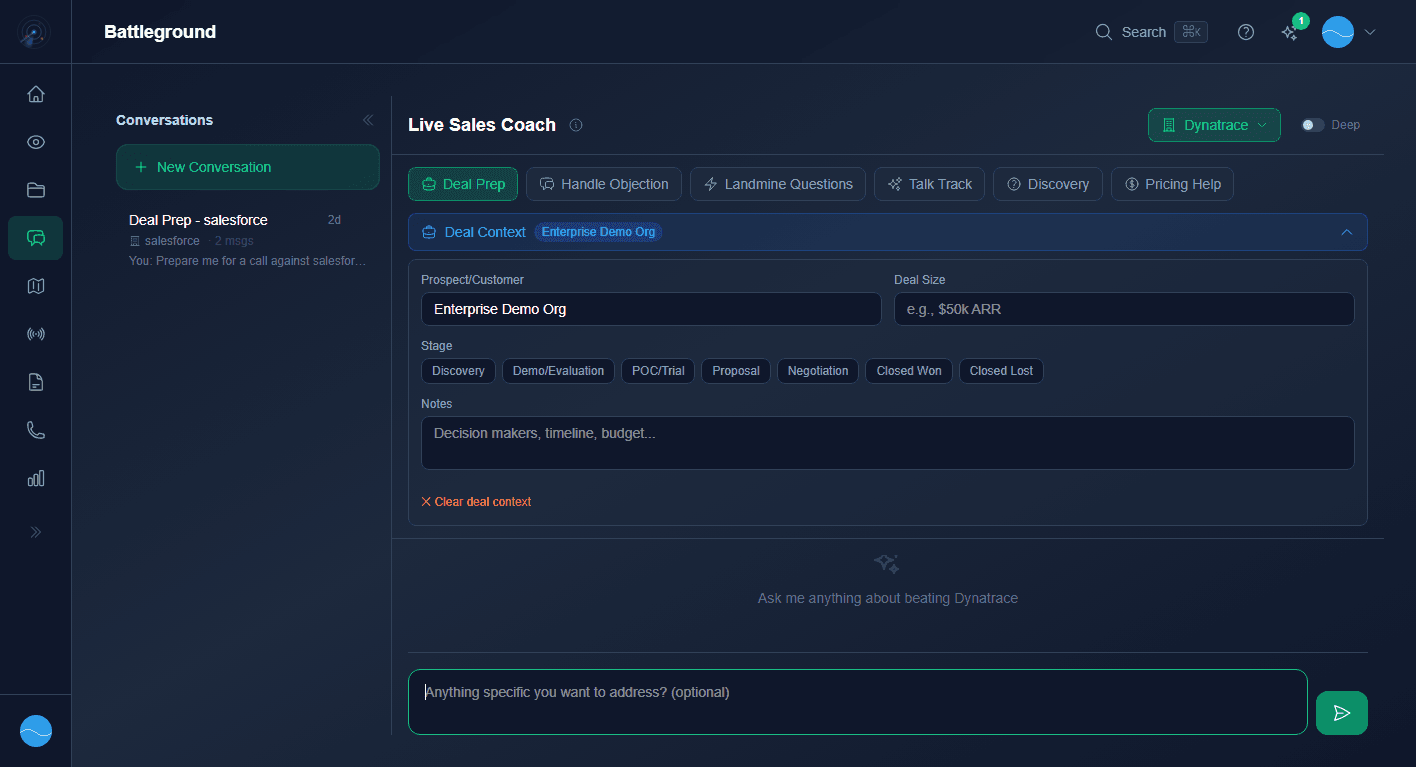
Battleground offers these coaching modes:
- Deal Prep
- Handle Objection
- Landmine Questions
- Talk Track
- Discovery
- Pricing Help
Each mode provides specialized guidance tailored to that sales situation.
Live Call Mode
Instant 'Buying Time' Questions
All plansDuring live calls, the coach generates instant buying-time questions you can ask the prospect while a more detailed response is being prepared. This ensures you never have an awkward silence when hit with a tough competitive question.
Example: If a prospect says "Company X is 50% cheaper," the coach immediately suggests a follow-up question like "Are you comparing at the same seat count and feature set?" while generating a full response in the background.
Deal Context & Threads
The deal context panel lets you set Prospect/Customer, Deal Size, Stage selector, and Notes. This context persists across your conversation.
Conversation threads appear in the left sidebar, letting you switch between different conversations.
Use the competitor selector dropdown (top right) to focus on a specific competitor.
Toggle the "Deep" toggle for greater analysis depth.
What the Coach Knows
The Sales Coach draws from multiple data sources to give you the best advice:
- The Vault - all analyses in your library
- Knowledge base - your uploaded competitive documents (War Room+)
- Deal context - the specific deal details you provide
- Win/loss history - patterns from your recorded deal outcomes
- Real-time intelligence - the coach can reference recent news and competitor changes
Sales Context Personalization
You can set your industry and selling style in your profile, and the Coach AI adapts to match your approach. Whether you sell to enterprise or SMB, in SaaS or manufacturing, the coach adjusts its language, examples, and strategies accordingly.
- 1
Open Battleground
Click Battleground in the sidebar or press
⌘Kand type "battleground". - 2
Set your deal context (optional)
Provide the competitor name, deal size, and stage for tailored responses.
- 3
Ask your question
Type your question or describe the situation. The coach responds with streaming AI guidance.