Basecamp
Your mission control dashboard with competitive intelligence at a glance.
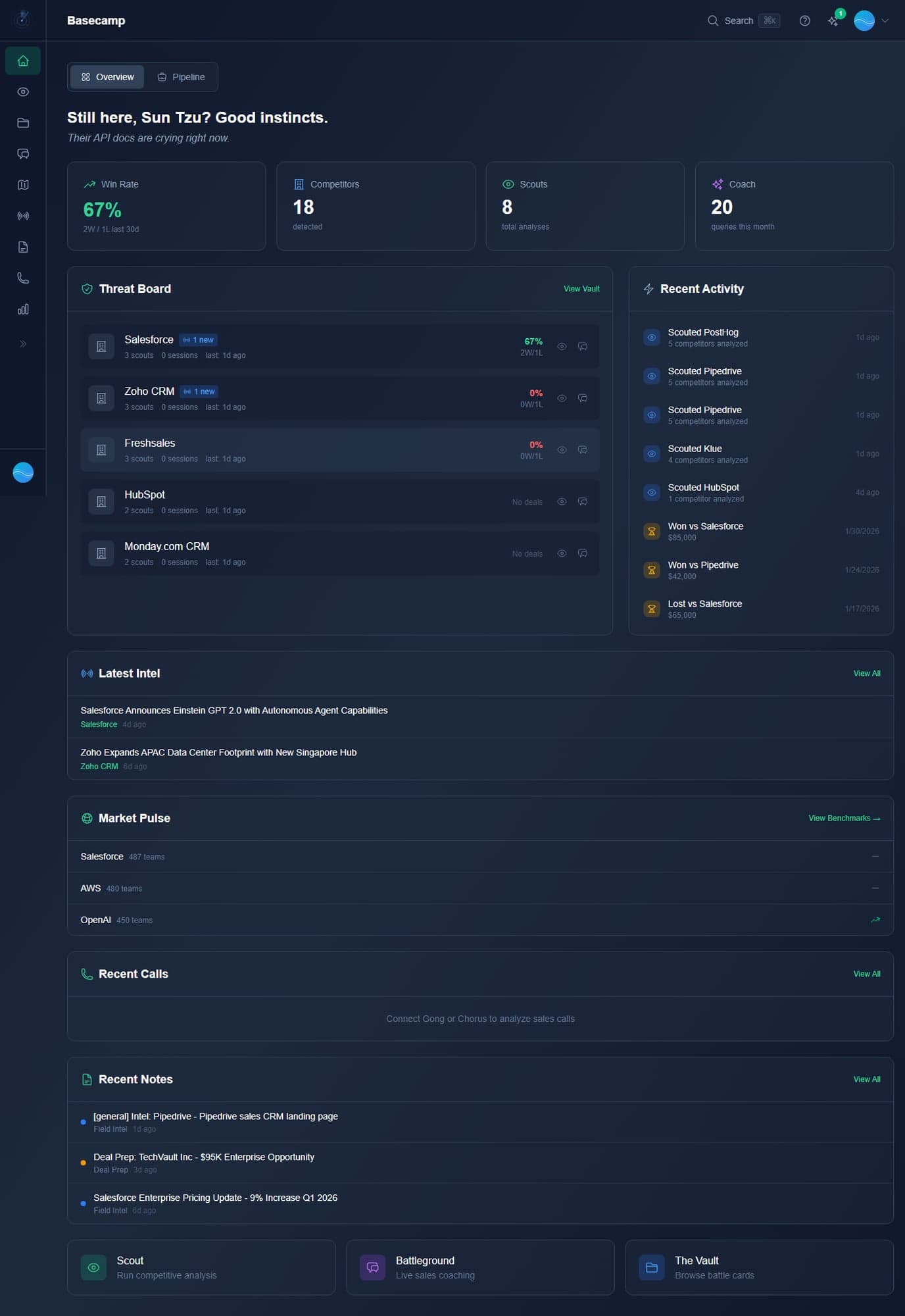
Overview Tab
The Overview tab is your competitive intelligence command center, showing everything you need to win deals today.
- Welcome message - Personalized greeting with motivational copy.
- Stats cards - Win Rate, active Competitors tracked, total Scouts (analyses), and Coach queries used this month.
- Threat Board - Top competitors ranked by deal activity, showing scout count, session count, win rate, and news indicators.
- Recent Activity - Timeline of analyses, win/loss records, and deal outcomes with links to details.
- Latest Intel - Fresh competitor news from the Intel Feed with source and date.
- Market Pulse - Trending competitors across the platform with team tracking counts.
- Recent Calls - Debriefing summaries from recent sales calls (requires Gong or Chorus integration).
- Recent Notes - Latest Field Notes with type badges and timestamps.
- Quick Action cards - One-click access to Scout, Battleground, and The Vault at the bottom of the page.
Pipeline Tab
The Pipeline tab (Deal Room) gives you a kanban-style view of your active deals with competitive intelligence overlaid on every opportunity.
- Deal stages - Discovery, Demo/Evaluation, POC/Trial, Proposal, Negotiation, Closed Won, Closed Lost.
- Competitor indicators - See which competitors are in play for each deal.
- Quick actions - Scout a competitor, open Battleground for the deal, add notes, update win/loss.
- Deal detail pages - Full context with linked battle cards, call history, and coaching transcripts.
- Salesforce sync - Pipeline deals auto-sync from Salesforce when connected.
Command Palette
Use the Command Palette (
Cmd+K or Ctrl+K) from anywhere to instantly jump to Scout, The Vault, Battleground, or any other page.