Intel Feed
Your unified hub for competitive intelligence — news, website changes, and alerts in one place.
Plan requirement
Overview
The Intel Feed combines two powerful intelligence sources into a single, unified stream:
- Competitor News — AI-classified articles from across the web about your competitors
- Website Monitoring Alerts — Automated detection of pricing, feature, and positioning changes on competitor websites
Everything is sorted chronologically so you can see the most recent competitive intelligence at a glance.
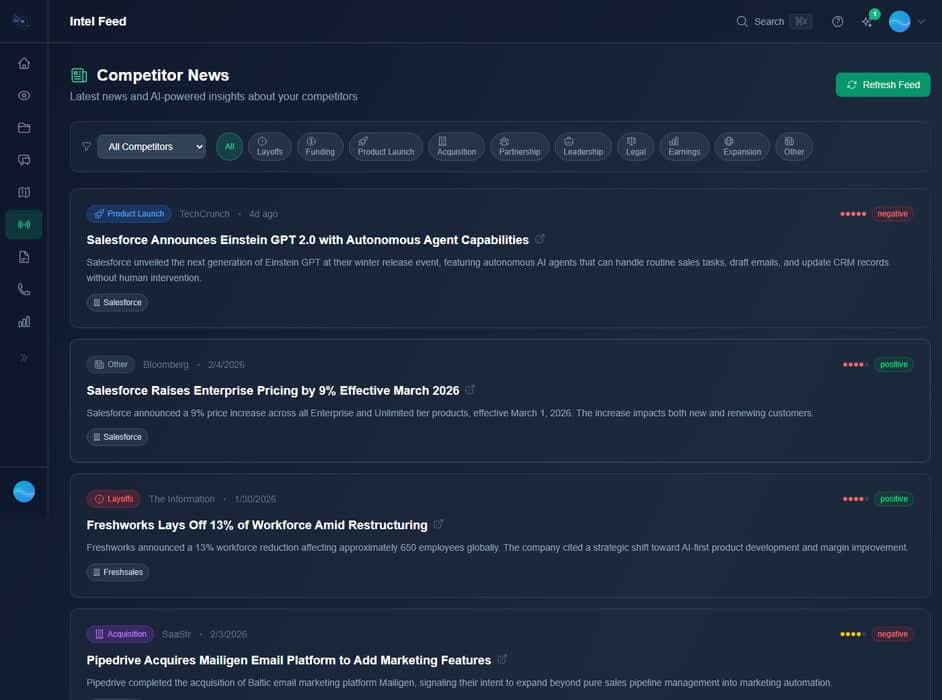
Competitor News
The news feed automatically monitors competitor activity and classifies each article by category, sentiment, and sales impact. Layoffs, funding rounds, product launches, leadership changes — you'll know first and understand what it means for your deals.
News Categories:
- Layoffs
- Funding
- Product Launch
- Acquisition
- Partnership
- Leadership
- Legal
- Earnings
- Expansion
Each news item includes sentiment analysis (positive, negative, neutral),importance rating, and sales impact notes explaining why it matters for your deals.
Website Monitoring
Website monitoring automatically checks your tracked competitors' websites on a daily or weekly schedule, detects changes to pricing, features, and positioning, and creates alerts so your team knows immediately when something important changes.
How Monitoring Works
- Website scanning — Rival Radar fetches the competitor's pricing and product pages.
- AI extraction — The AI extracts structured pricing plans, features, and positioning from the raw page content.
- Snapshot comparison — The new snapshot is compared against the previous one using AI to detect meaningful changes.
- Alert creation — When significant changes are detected (price changes, new features, plan restructuring), an alert is created.
Alert Types
- Pricing changes — Price increases, decreases, new plans, plan restructuring.
- Feature changes — New features added, features removed, capability changes.
- General changes — Significant positioning or messaging changes on their website.
Setting Up Monitoring
- 1
Track a competitor
Add a competitor to your tracked list and provide their website URL. This can be done from the Vault or when running a Scout analysis.
- 2
Enable monitoring
Go to the Intel Feed, click the Monitoring tab, and toggle monitoring on for the competitor. Choose what to monitor (pricing, features, news) and the check frequency.
- 3
Review alerts
When changes are detected, alerts appear in your Intel Feed alongside news articles. Each alert includes the type of change, a summary of what changed, and a link to the source.
Check Frequency
You can set each competitor to be checked daily or weekly:
- Daily — Checked once per day (recommended for top competitors)
- Weekly — Checked once per week (good for secondary competitors)
Best practice
Filtering & Search
Filter the Intel Feed by competitor, or toggle between viewing all items, news only, or alerts only. This helps you quickly find the intelligence that matters for your upcoming deals.
Slack Notifications
With the Slack integration, you can push high-impact competitor news and monitoring alerts directly to a Slack channel. Configure which competitors to track and which channels to post to in the Slack integration settings.