War Map
Visualize where you and your competitors stand across key market dimensions.
Plan requirement
Overview
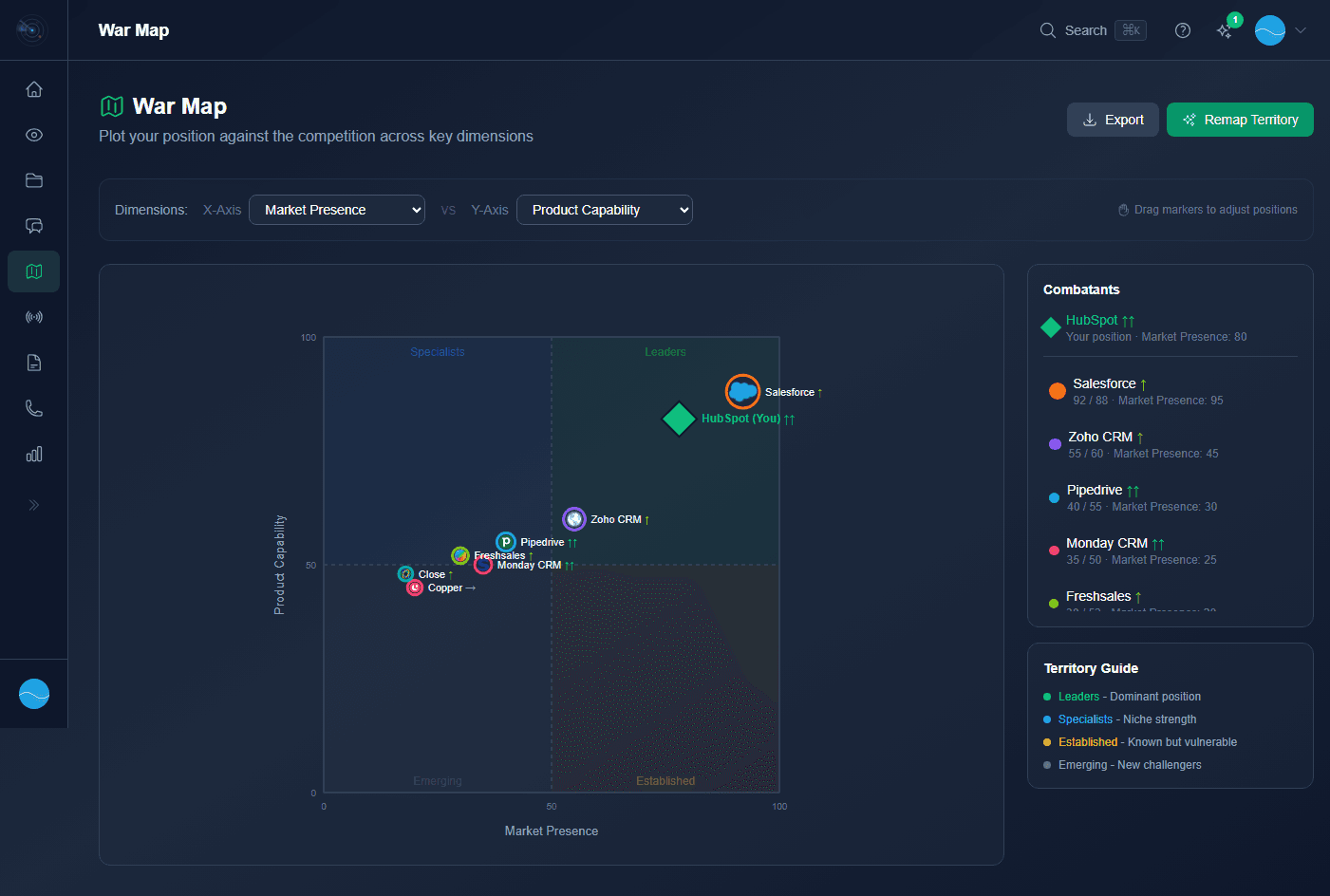
The War Map plots your competitors on a 2D grid using X-Axis and Y-Axis dimension dropdowns.
The Combatants panel shows all competitors on the map. Use drag-and-drop to adjust positioning.
Territory Guide categorizes positions: Leaders, Specialists, Established, Emerging.
Market presence scores and momentum arrows provide additional context.
Use the Remap Territory button for AI re-calculation of all positions. Export button saves the map.
Creating a Matrix
- 1
Choose your axes
Pick two dimensions to compare. These can be anything relevant to your market: price, features, ease of use, support quality, scalability, etc.
- 2
Add competitors
Add competitors from your library. Their initial position can be AI-generated based on your battle cards, or you can place them manually.
- 3
Position with drag-and-drop
Drag competitors to adjust their position on the grid. You can also drag your own company to reflect your true positioning.
- 4
Share with your team
The matrix is shared across your organization. Team members can view and reference it during deal preparation.
AI-Generated Positioning
When you add competitors to a matrix, Rival Radar can automatically suggest positions based on the intelligence from your battle cards. This gives you a data-driven starting point that you can then refine based on your team's market knowledge.
Pro tip