Win/Loss Tracking
Record competitive deal outcomes and let AI uncover the patterns behind your wins and losses.
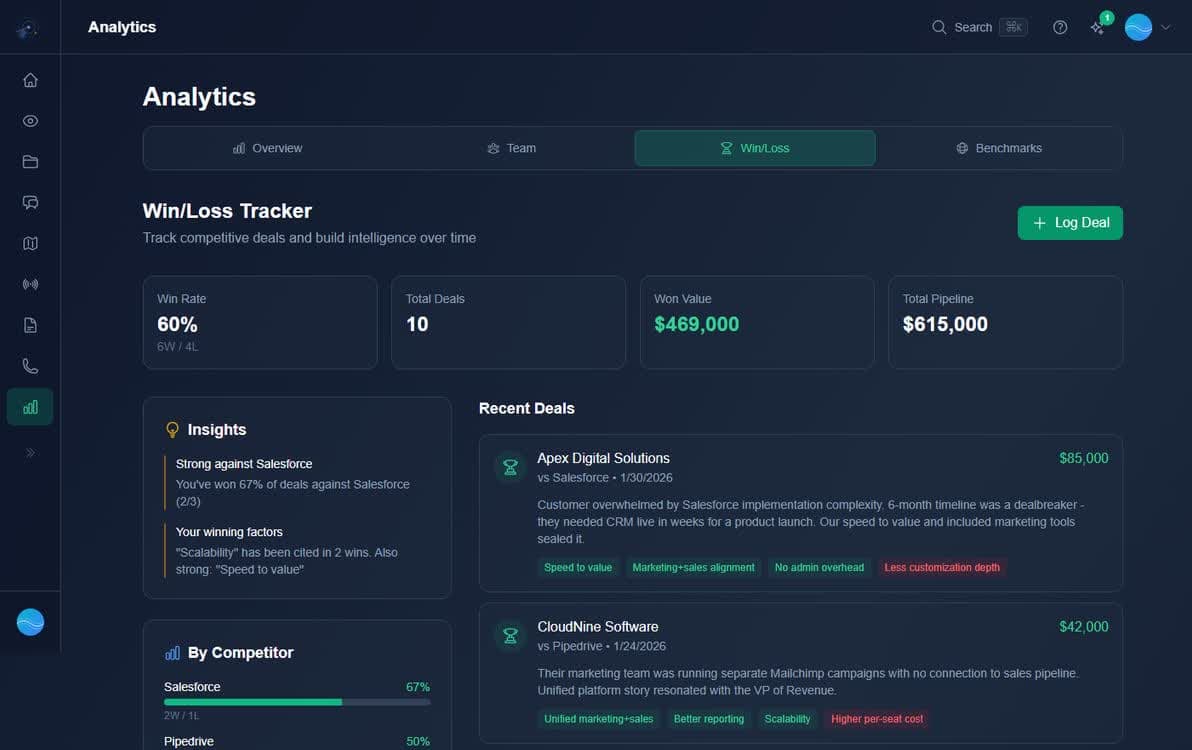
Win/Loss tracking is now a tab within the Analytics page (alongside Overview, Team, and Benchmarks). Record the outcome of competitive deals - which competitor you faced, whether you won or lost, and key context about why. Over time, AI spots patterns: why you win against certain competitors, why you lose, and what you can do about it.
Insights Panel
The AI-generated Insights panel shows high-level takeaways like "Strong against Salesforce" or"Losing to startups on price". These summarize patterns across your deal data.
By Competitor Breakdown
See win rates for each competitor with visual bar charts. Hover for deal count, total revenue at stake, and time since last deal. Spot which battles you're winning - and which need attention.
Recording a Deal Outcome
Click the "Log Deal" button to add a new deal outcome. Each deal card shows tags for winning/losing factors you logged - price, product fit, relationship, etc. The more context you provide, the better the AI insights.
- 1
Navigate to Analytics > Win/Loss
Find Win/Loss as a tab in your Analytics dashboard.
- 2
Click Log Deal
Enter competitor, outcome (won/lost), deal value, and winning/losing factors.
- 3
Review insights over time
AI surfaces per-competitor win rates, revenue impact, and actionable recommendations.
Sync with the Salesforce Integration
With the Salesforce integration (War Room and Command Center), deal outcomes sync automatically from Basecamp's Pipeline tab. No manual entry - closed deals with competitor data flow directly into your Win/Loss analysis.
Feed the flywheel